How to create a Uniswap V3 staking program
Learn how to configure and deploy your own Uniswap v3 staking program Mark Curchin
 If you've launched a token and want to reward your Uniswap v3 liquidity providers but found no official interface for it, this guide has the answer. You'll learn how to find your v3 pool address, approve the reward token transfer, and deploy an incentive program by calling createIncentive on the canonical Staker contract straight from Etherscan.
While the smart contracts have been up and running since the summer of 2021, the Uniswap team has never provided a user interface to launch, manage or stake LP tokens. This is why we have decided to share our experience of launching the Uniswap Staking program. In this article we will walk you through the steps necessary to launch your own Uniswap v3 staking program. Note that although Uniswap v4 is live, the canonical Staker contract serves v3 positions only, so this guide applies to v3 pools.
Before you begin
The screenshots in this guide were made on the Rinkeby testnet, which Ethereum deprecated in 2023. There is no verified deployment of the canonical Staker on Sepolia, so if you want a dry run before spending real funds, fork mainnet locally with a tool like Anvil or Hardhat and interact with the mainnet Staker address there; the flow is identical. On the Mainnet, use the addresses listed in the Uniswap repository.
Before proceeding with staking, you must provide liquidity to your liquidity pool and receive the NFT position. To do it, head to the Uniswap application. If you don’t have a pool yet, Uniswap will automatically create one for you when you provide liquidity for the first time.
Incentive program
What is the Uniswap Staking incentive program?
The entire Uniswap v3 stake revolves around incentive programs. It represents your liquidity mining program or staking instance inside their smart contracts. An incentive program is like a pool with a limited amount of tokens to distribute in which staking takes place.
Deploying incentive program
You won't have to build your own interface to deploy an incentive program or conclude it. Since these are just administrator actions, Etherscan’s interface will be sufficient to cover the creation of the program.
Note: You can create multiple incentive programs for the same Uniswap v3 pool, even concurrently. Each program is identified by the unique combination of its five parameters (rewardToken, pool, startTime, endTime, refundee), so as long as one of them differs, createIncentive will succeed.
To deploy an incentive program, you will need the following things prepared:
- rewardToken - your ERC-20 token address
- pool - Uniswap v3 pair pool address
- startTime - start date in Unix timestamp
- endTime - end date in Unix timestamp
- refundee - refundee address
- tokens on your wallet that you will transfer to your incentive program for distribution.
- Approve the amount of tokens you are about to transfer into the Staker contract.
How to find your Uniswap v3 pair pool address?
- In the Etherscan find the Uniswap v3 pool creation transaction
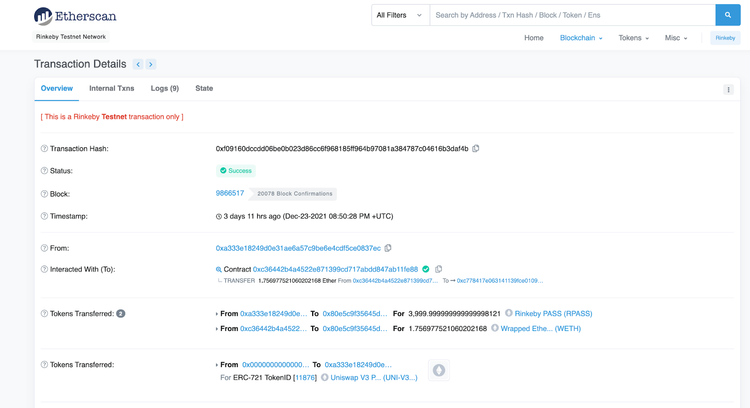
- Open the logs tab and search the following information
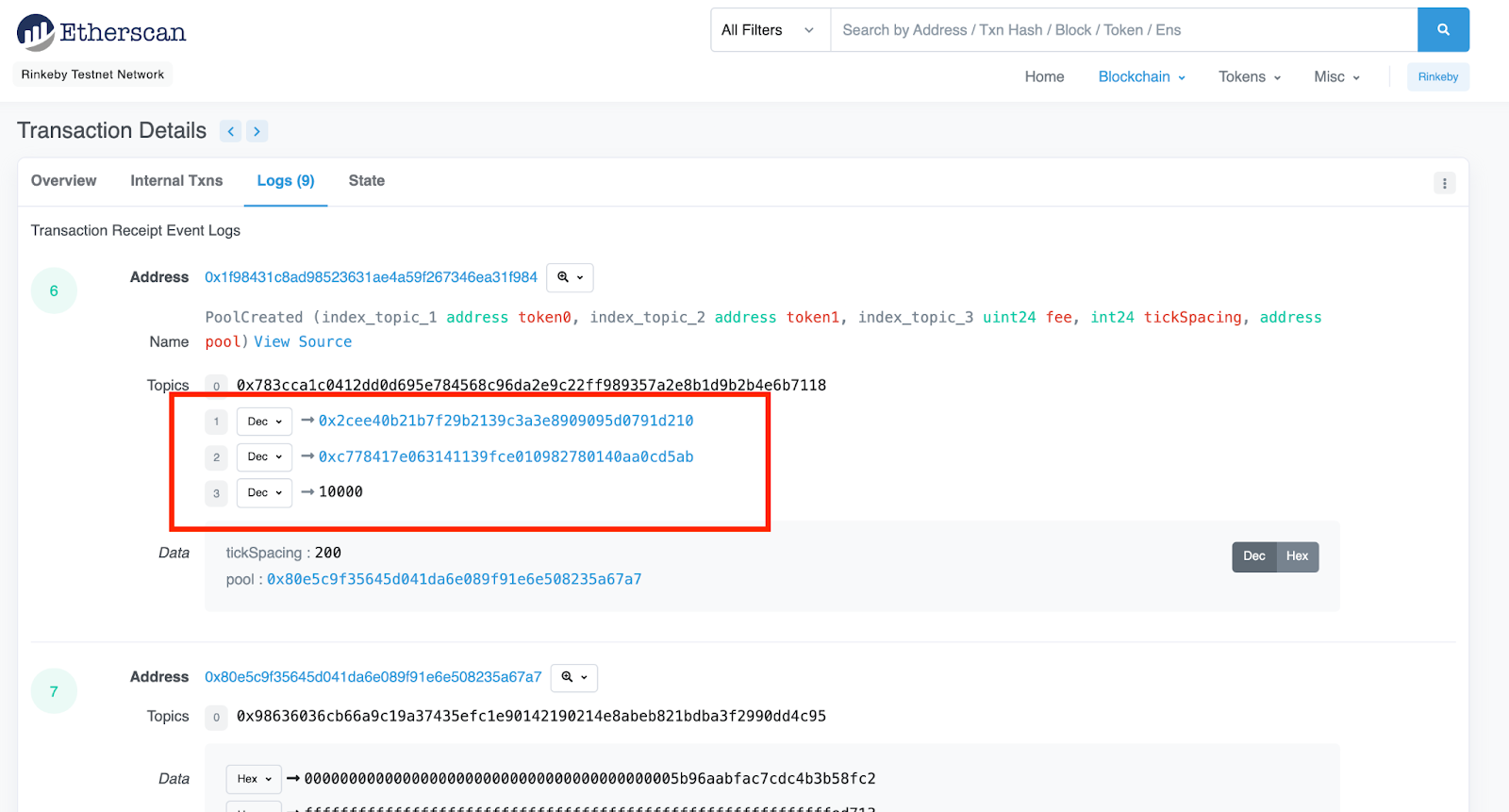
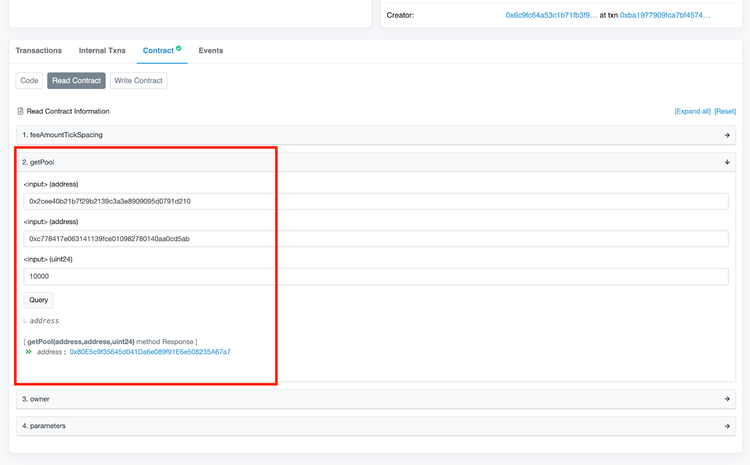
- Open the Uniswap v3 PoolFactory contract in a new tab and switch to the Read the contract
- Copy the information from Step 2 into the getPool tab
- Click Query and view the pool address
How to approve token transfer
Before you can create your Incentive program, you must approve the token transfer into the Staker contract. Otherwise, the createIncentive transaction will fail.
- Open your token contract in Etherscan and switch to Write Contract tab
- Connect your wallet
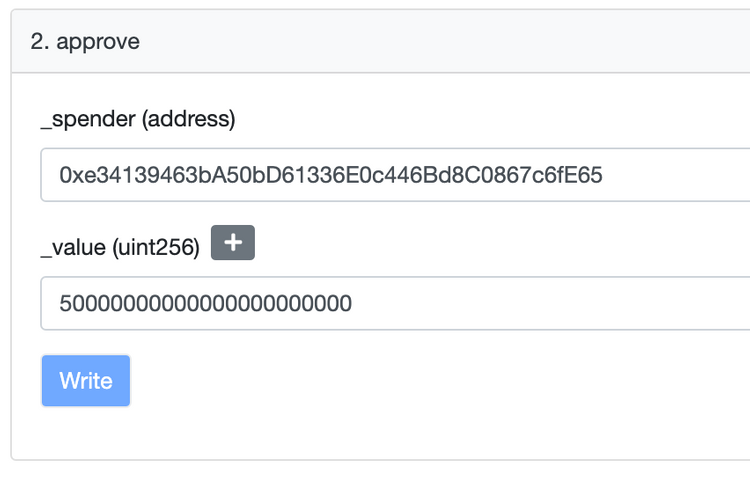
- Find the approve transaction and complete the following information
- _spender - the Staker contract address
- _value - the amount of token you want to use for the incentive program in Wei.
- Click Write and submit the transaction. Once successfully executed, you can proceed with the next step.
Create incentive
Back to the Incentive program, you’ll need to follow the next steps for successful deployment:
- Open Uniswap v3 Staker contract in Etherscan and switch to Write contract
- Connect your wallet
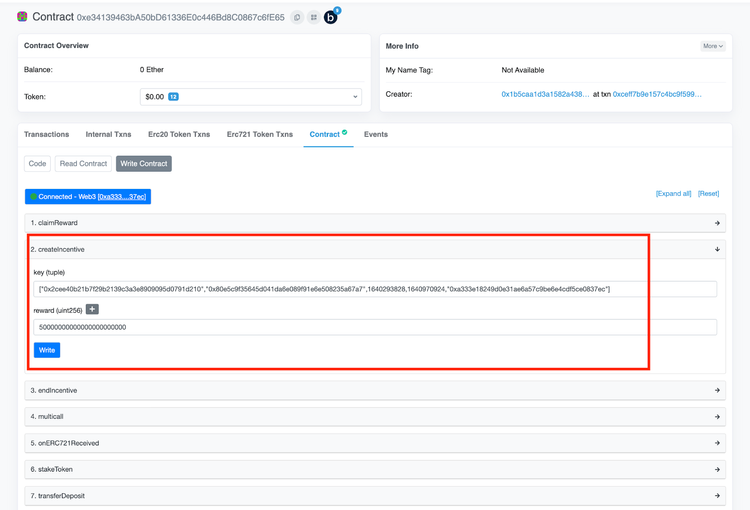
- Find the createIncentive tab and write the addresses you prepared in the beginning of this guide, in the following order
["REWARD_TOKEN_ADDRESS","POOL_ADDRESS",START_DATE,END_DATE,"REFUNDEE_ADDRESS"]
Make sure the addresses are written between quotation marks.
- In the reward input write the amount of tokens you want to distribute. The value must be written in Wei depending on your token decimals. Use this handy Unit Converter to convert from regular numbers into Wei.
- Click Write and follow the instructions in your wallet.
Example:
Congrats! 🎉 If you have followed our guide closely, you have successfully deployed your Incentive program.
Read Next


straight to your inbox